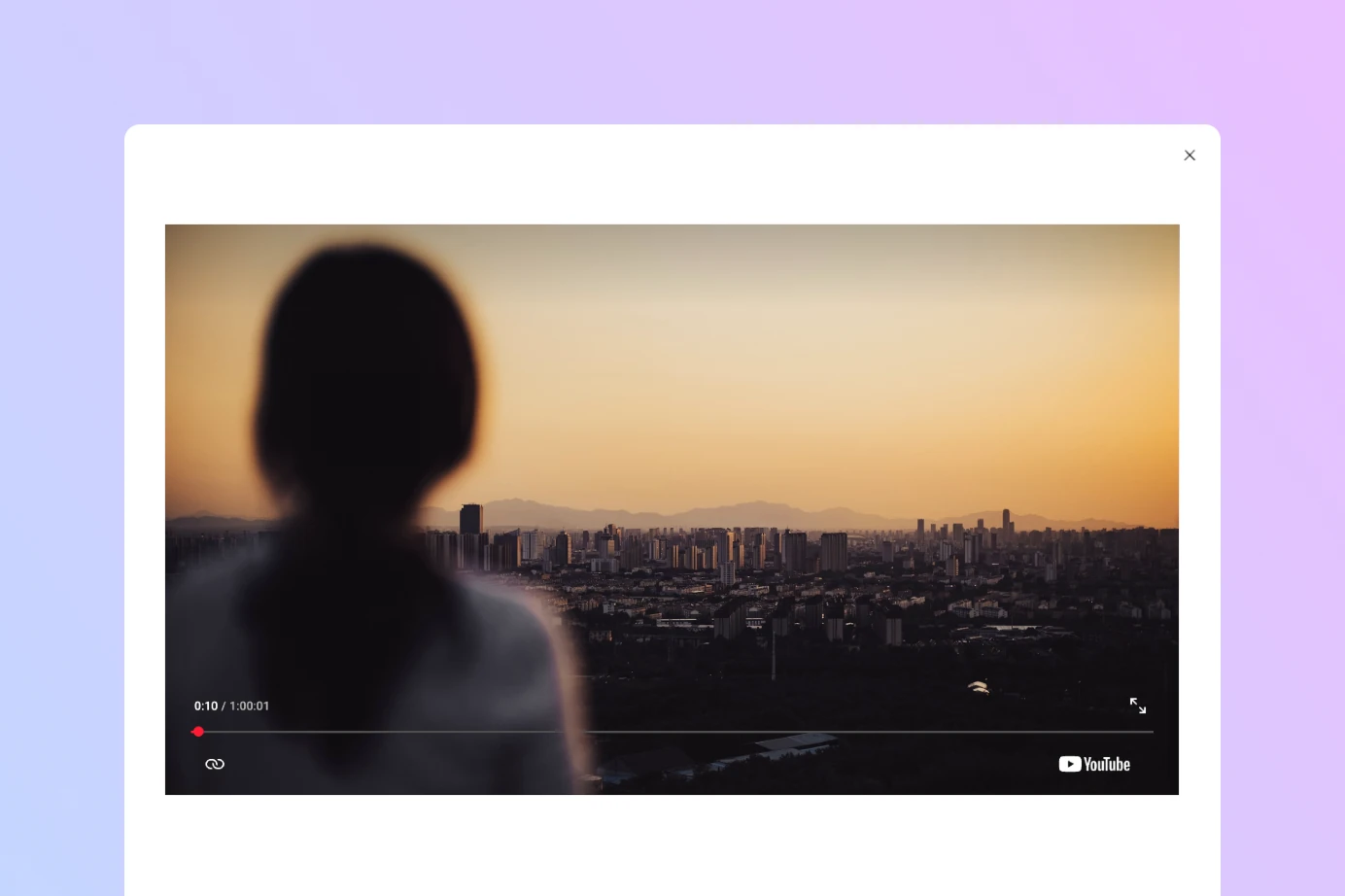
Adding a WordPress video lightbox to your site lets visitors watch YouTube, Vimeo, or hosted videos in an overlay popup without leaving the page. This keeps users engaged and avoids the friction of navigating away from your content. With Twentig, you can enable a video lightbox directly from the core Button block, no dedicated WordPress video lightbox plugin required.
What is a video lightbox in WordPress?
A lightbox is an overlay that appears on top of the current page. When applied to a video, clicking a button opens the video in a centered popup while the rest of the page dims in the background. This is a common pattern for hero sections, landing pages, product demonstrations, trailers, and testimonials, anywhere you want to feature a video without embedding a large player directly into the page.
While WordPress includes a native lightbox for images and galleries, it does not include a native video lightbox feature. Twentig extends the core Button block to add this capability as a built-in toggle.
Click the button below to see the WordPress video lightbox in action.
How to add a video lightbox to a WordPress button block
Twentig extends the core Button block with an “Open video in lightbox” option. To get started, install the Twentig plugin. Here is how to set it up.
Step 1: add a button block
Insert a Button block anywhere on your page or post. Enter a clear label such as “Watch the video” or “View the demo”.
Step 2: link the button to a video URL
With the Button block selected, click the Link icon in the block toolbar or press Ctrl + K on Windows / Cmd + K on Mac. Paste the URL of the video you want to open.
Twentig supports YouTube videos, Vimeo videos, and direct links to video files.
YouTube
You can use standard, shortened, and Shorts URLs:
https://youtu.be/abc123https://www.youtube.com/watch?v=abc123https://www.youtube.com/shorts/abc123
Vimeo
Both regular Vimeo links and player links are supported:
https://vimeo.com/456xyzhttps://player.vimeo.com/video/456xyz
Self-hosted video files
You can also link directly to an MP4 or WebM video hosted in your WordPress Media Library or on another server:
https://yourdomain.com/video.mp4https://yourdomain.com/video.webm
Step 3: enable the video lightbox toggle
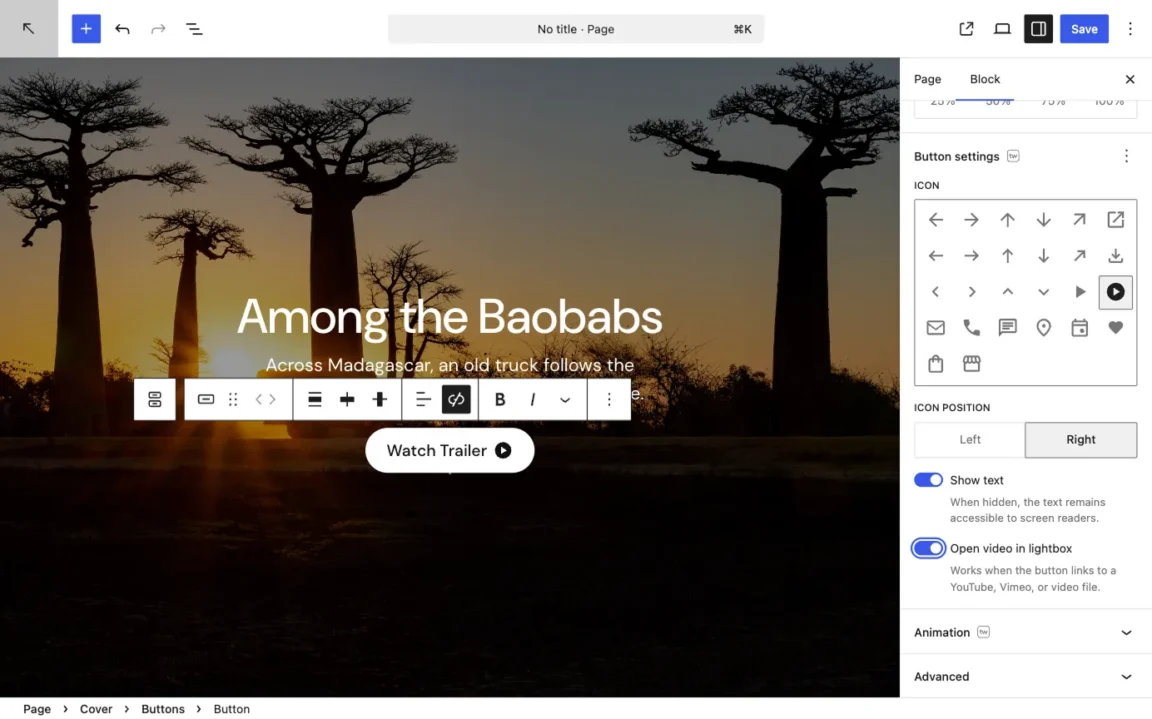
In the Button block settings panel on the right side of the editor, toggle on Open video in lightbox. When a visitor clicks the button, the video will open in an overlay popup instead of sending them to a separate page.
Customize the button appearance
Because the video lightbox is built on top of the standard Button block, you have full access to all native WordPress button styles:
- Fill or outline style
- Background and text colors
- Typography
- Padding
- Border width
- Border radius
This makes it straightforward to match the video button to the rest of your site without a separate block with different styling controls.
Add a play icon to your video button
Twentig includes two dedicated play icons as part of its icons for the Button block, making it visually clear to visitors that clicking will play a video.
To add an icon, open the Icon panel in the block settings and select one of the play icons from the icon picker. You can then position it to the left or right of the button label using the Icon position setting.
For a compact icon-only button, toggle off Show text. The visible label will be hidden while the text remains available to screen readers. Use a descriptive label such as “Play introduction video” so the purpose of the button stays accessible. You can also increase the button font size to make the play icon larger.
Customize the WordPress video lightbox appearance
By default, the lightbox overlay uses your theme’s base and contrast colors, the same presets normally used for the body background and body text. The video container takes the wide width of your theme and displays in a standard 16:9 aspect ratio. YouTube Shorts are an exception and retain their vertical 9:16 format.
Twentig provides two optional CSS classes for adjusting the appearance of the video popup. To use one, select the Button block, open the Advanced panel, and enter the class in the Additional CSS class(es) field.
Use a dark lightbox
The tw-lightbox-dark class overrides this with a dark theme, useful if your theme’s base color is light and you want stronger contrast around the video, or for a more cinematic feel.
Display the video full screen
The tw-lightbox-full class displays the video in a full-screen lightbox, giving it the maximum available space for a more immersive viewing experience.
You can use either class on its own, or combine both for a dark, full-screen presentation tw-lightbox-dark tw-lightbox-full.
A lightweight approach built on WordPress standards
The Twentig WordPress video lightbox is powered by the WordPress Interactivity API, the official framework introduced in WordPress 6.5 for handling interactive behavior in blocks. This means the lightbox does not rely on jQuery or any external JavaScript library, keeping the implementation lightweight and standards-compliant.
The popup design also follows the same visual conventions as the core WordPress Image block lightbox, using the same colors and close icon, so the experience feels native to WordPress rather than like a third-party add-on.
By extending the core Button block, Twentig provides a straightforward way to add a WordPress video lightbox while preserving the styling options and editing workflow already available in the block editor.
WordPress video lightbox examples
Here are three ready-to-use video lightbox block patterns you can copy and paste directly into the WordPress editor.
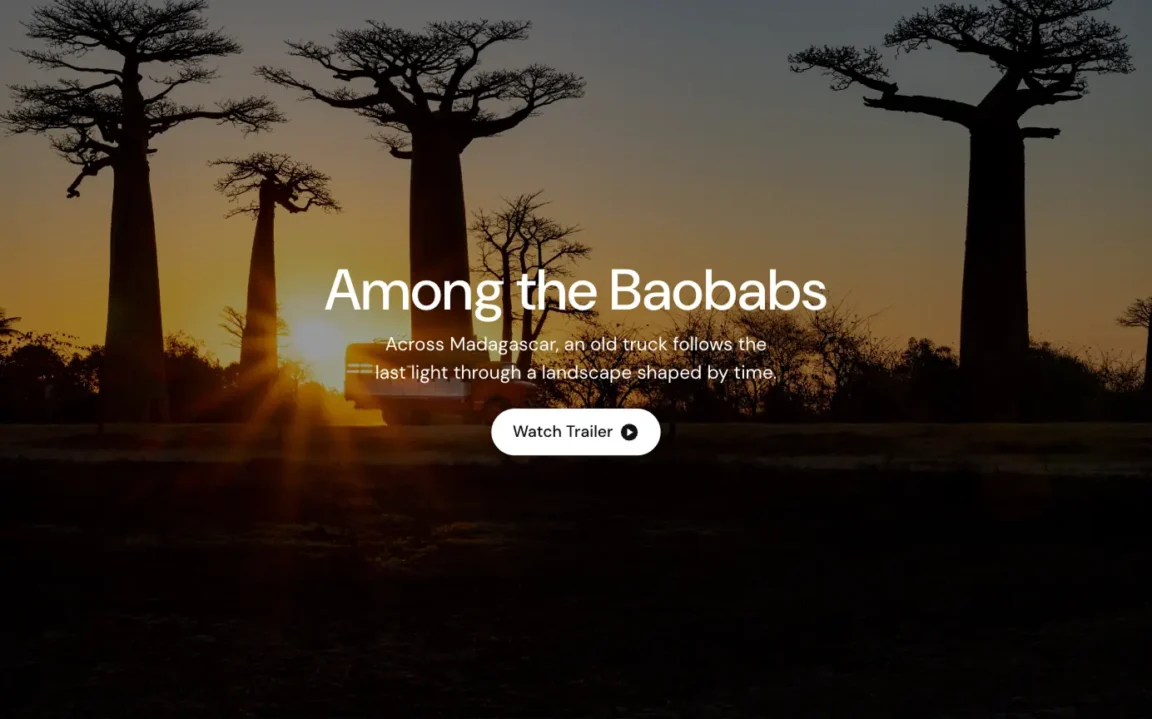
Hero section with a play button
A full-width cover block with a background image and a centered play button. This is one of the most common uses for a video lightbox: a cinematic hero section that invites visitors to watch a trailer or introduction video.
<!-- wp:cover {"url":"https://images.unsplash.com/photo-1781428269435-06550e27ea7a?q=100\u0026w=2670\u0026auto=format\u0026fit=crop\u0026ixlib=rb-4.1.0\u0026ixid=M3wxMjA3fDB8MHxwaG90by1wYWdlfHx8fGVufDB8fHx8fA%3D%3D","dimRatio":50,"isUserOverlayColor":true,"minHeight":100,"minHeightUnit":"vh","sizeSlug":"large","align":"full","layout":{"type":"constrained"}} -->
<div class="wp-block-cover alignfull" style="min-height:100vh"><img class="wp-block-cover__image-background size-large" alt="" src="https://images.unsplash.com/photo-1781428269435-06550e27ea7a?q=100&w=2670&auto=format&fit=crop&ixlib=rb-4.1.0&ixid=M3wxMjA3fDB8MHxwaG90by1wYWdlfHx8fGVufDB8fHx8fA%3D%3D" data-object-fit="cover"/><span aria-hidden="true" class="wp-block-cover__background has-background-dim"></span><div class="wp-block-cover__inner-container"><!-- wp:heading {"level":1,"style":{"typography":{"textAlign":"center"}}} -->
<h1 class="wp-block-heading has-text-align-center">Among the Baobabs</h1>
<!-- /wp:heading -->
<!-- wp:paragraph {"style":{"typography":{"textAlign":"center"}},"fontSize":"medium"} -->
<p class="has-text-align-center has-medium-font-size">Across Madagascar, an old truck follows the last light through a landscape shaped by time.</p>
<!-- /wp:paragraph -->
<!-- wp:buttons {"style":{"spacing":{"margin":{"top":"var:preset|spacing|30"}}},"layout":{"type":"flex","justifyContent":"center"}} -->
<div class="wp-block-buttons" style="margin-top:var(--wp--preset--spacing--30)"><!-- wp:button {"backgroundColor":"base","textColor":"contrast","style":{"elements":{"link":{"color":{"text":"var:preset|color|contrast"}}}},"twIcon":"play-circle","twOpenDialog":true} -->
<div class="wp-block-button"><a class="wp-block-button__link has-contrast-color has-base-background-color has-text-color has-background has-link-color wp-element-button" href="https://www.youtube.com/watch?v=ZKsbpEoTyLM">Watch Trailer</a></div>
<!-- /wp:button --></div>
<!-- /wp:buttons --></div></div>
<!-- /wp:cover -->
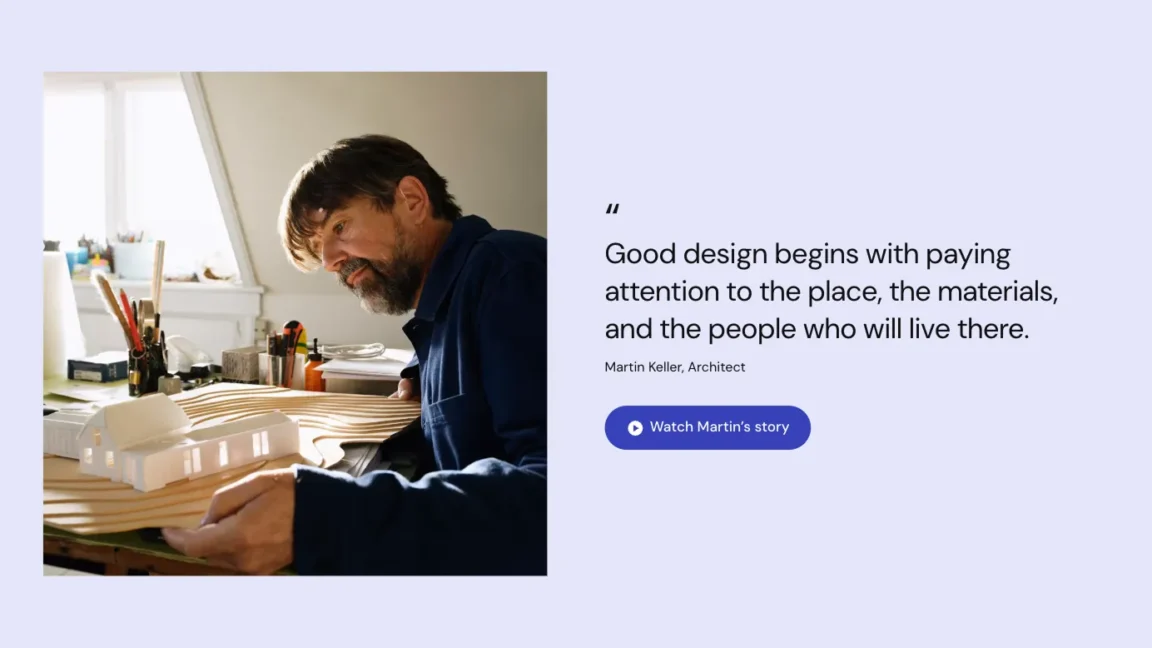
Feature section with a video button
A two-column layout combining an image with a quote or description and a labeled play button. This works well for testimonials, case studies, or any section where you want to pair written content with a video.
<!-- wp:group {"align":"full","style":{"spacing":{"padding":{"top":"var:preset|spacing|70","bottom":"var:preset|spacing|70"}}},"backgroundColor":"base-3","layout":{"type":"constrained"}} -->
<div class="wp-block-group alignfull has-base-3-background-color has-background" style="padding-top:var(--wp--preset--spacing--70);padding-bottom:var(--wp--preset--spacing--70)"><!-- wp:columns {"align":"wide","style":{"spacing":{"blockGap":{"left":"var:preset|spacing|60"}}}} -->
<div class="wp-block-columns alignwide"><!-- wp:column -->
<div class="wp-block-column"><!-- wp:image {"sizeSlug":"large"} -->
<figure class="wp-block-image size-large"><img src="https://images.unsplash.com/photo-1772442198907-765685249ea4?q=80&auto=format&fit=crop&ixlib=rb-4.1.0&ixid=M3wxMjA3fDB8MHxwaG90by1wYWdlfHx8fGVufDB8fHx8fA%3D%3D&h=1200&w=1200" alt=""/></figure>
<!-- /wp:image --></div>
<!-- /wp:column -->
<!-- wp:column {"verticalAlignment":"center"} -->
<div class="wp-block-column is-vertically-aligned-center"><!-- wp:quote {"className":"is-style-tw-icon tw-text-balance","fontSize":"large"} -->
<blockquote class="wp-block-quote is-style-tw-icon tw-text-balance has-large-font-size"><!-- wp:paragraph {"style":{"typography":{"lineHeight":"1.3"}},"fontSize":"x-large"} -->
<p class="has-x-large-font-size" style="line-height:1.3">Good design begins with paying attention to the place, the materials, and the people who will live there.</p>
<!-- /wp:paragraph --><cite>Martin Keller, Architect</cite></blockquote>
<!-- /wp:quote -->
<!-- wp:buttons {"style":{"spacing":{"margin":{"top":"var:preset|spacing|30"}}}} -->
<div class="wp-block-buttons" style="margin-top:var(--wp--preset--spacing--30)"><!-- wp:button {"twIcon":"play-circle","twIconPosition":"left","twOpenDialog":true} -->
<div class="wp-block-button"><a class="wp-block-button__link wp-element-button" href="https://www.youtube.com/watch?v=ZKsbpEoTyLM">Watch Martin’s story</a></div>
<!-- /wp:button --></div>
<!-- /wp:buttons --></div>
<!-- /wp:column --></div>
<!-- /wp:columns --></div>
<!-- /wp:group -->
Image grid with icon-only play buttons
A grid of images with a compact icon-only play button centered over each one. This is ideal for video portfolios, film reels, or any layout where you want a clean, minimal trigger for the lightbox without visible button text.
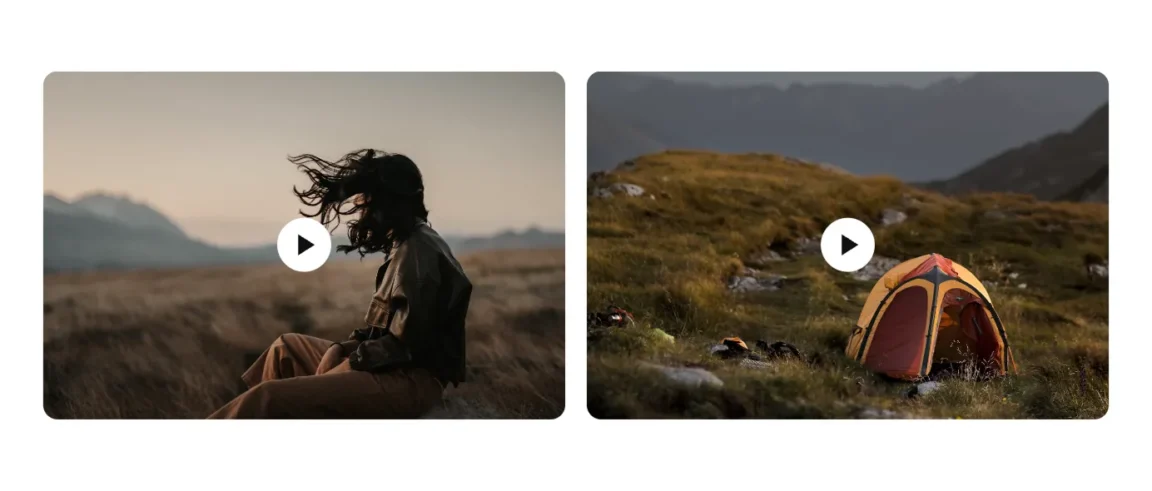
<!-- wp:group {"align":"full","style":{"spacing":{"padding":{"top":"var:preset|spacing|70","bottom":"var:preset|spacing|70"}}},"layout":{"type":"constrained"}} -->
<div class="wp-block-group alignfull" style="padding-top:var(--wp--preset--spacing--70);padding-bottom:var(--wp--preset--spacing--70)"><!-- wp:group {"align":"wide","layout":{"type":"grid","columnCount":2,"minimumColumnWidth":"300px"}} -->
<div class="wp-block-group alignwide"><!-- wp:cover {"url":"https://images.unsplash.com/photo-1615065592543-334b128affca?q=100\u0026w=1200\u0026h=900\u0026auto=format\u0026fit=crop\u0026ixlib=rb-4.1.0\u0026ixid=M3wxMjA3fDB8MHxwaG90by1wYWdlfHx8fGVufDB8fHx8fA%3D%3D","dimRatio":0,"isUserOverlayColor":true,"sizeSlug":"large","style":{"dimensions":{"aspectRatio":"3/2"},"border":{"radius":{"topLeft":"var:preset|border-radius|large","topRight":"var:preset|border-radius|large","bottomLeft":"var:preset|border-radius|large","bottomRight":"var:preset|border-radius|large"}}},"layout":{"type":"constrained"},"twStretchedLink":true,"twHover":"zoom"} -->
<div class="wp-block-cover tw-stretched-link tw-hover-zoom" style="border-top-left-radius:var(--wp--preset--border-radius--large);border-top-right-radius:var(--wp--preset--border-radius--large);border-bottom-left-radius:var(--wp--preset--border-radius--large);border-bottom-right-radius:var(--wp--preset--border-radius--large)"><img class="wp-block-cover__image-background size-large" alt="" src="https://images.unsplash.com/photo-1615065592543-334b128affca?q=100&w=1200&h=900&auto=format&fit=crop&ixlib=rb-4.1.0&ixid=M3wxMjA3fDB8MHxwaG90by1wYWdlfHx8fGVufDB8fHx8fA%3D%3D" data-object-fit="cover"/><span aria-hidden="true" class="wp-block-cover__background has-background-dim-0 has-background-dim"></span><div class="wp-block-cover__inner-container"><!-- wp:buttons {"layout":{"type":"flex","justifyContent":"center"}} -->
<div class="wp-block-buttons"><!-- wp:button {"backgroundColor":"base","textColor":"contrast","style":{"elements":{"link":{"color":{"text":"var:preset|color|contrast"}}},"spacing":{"padding":{"left":"var:preset|spacing|10","right":"var:preset|spacing|10","top":"var:preset|spacing|10","bottom":"var:preset|spacing|10"}}},"fontSize":"x-large","twIcon":"play","twShowLabel":false,"twOpenDialog":true} -->
<div class="wp-block-button"><a class="wp-block-button__link has-contrast-color has-base-background-color has-text-color has-background has-link-color has-x-large-font-size has-custom-font-size wp-element-button" href="https://www.youtube.com/watch?v=ZKsbpEoTyLM" style="padding-top:var(--wp--preset--spacing--10);padding-right:var(--wp--preset--spacing--10);padding-bottom:var(--wp--preset--spacing--10);padding-left:var(--wp--preset--spacing--10)">Play</a></div>
<!-- /wp:button --></div>
<!-- /wp:buttons --></div></div>
<!-- /wp:cover -->
<!-- wp:cover {"url":"https://images.unsplash.com/photo-1747763709371-8cf6d91a2623?q=80\u0026w=1200\u0026h=900\u0026auto=format\u0026fit=crop\u0026ixlib=rb-4.1.0\u0026ixid=M3wxMjA3fDB8MHxwaG90by1wYWdlfHx8fGVufDB8fHx8fA%3D%3D\u0026fp-y=.6","id":55,"dimRatio":0,"isUserOverlayColor":true,"sizeSlug":"large","style":{"dimensions":{"aspectRatio":"3/2"},"border":{"radius":{"topLeft":"var:preset|border-radius|large","topRight":"var:preset|border-radius|large","bottomLeft":"var:preset|border-radius|large","bottomRight":"var:preset|border-radius|large"}}},"layout":{"type":"constrained"},"twStretchedLink":true,"twHover":"zoom"} -->
<div class="wp-block-cover tw-stretched-link tw-hover-zoom" style="border-top-left-radius:var(--wp--preset--border-radius--large);border-top-right-radius:var(--wp--preset--border-radius--large);border-bottom-left-radius:var(--wp--preset--border-radius--large);border-bottom-right-radius:var(--wp--preset--border-radius--large)"><img class="wp-block-cover__image-background wp-image-55 size-large" alt="" src="https://images.unsplash.com/photo-1747763709371-8cf6d91a2623?q=80&w=1200&h=900&auto=format&fit=crop&ixlib=rb-4.1.0&ixid=M3wxMjA3fDB8MHxwaG90by1wYWdlfHx8fGVufDB8fHx8fA%3D%3D&fp-y=.6" data-object-fit="cover"/><span aria-hidden="true" class="wp-block-cover__background has-background-dim-0 has-background-dim"></span><div class="wp-block-cover__inner-container"><!-- wp:buttons {"layout":{"type":"flex","justifyContent":"center"}} -->
<div class="wp-block-buttons"><!-- wp:button {"backgroundColor":"base","textColor":"contrast","style":{"elements":{"link":{"color":{"text":"var:preset|color|contrast"}}},"spacing":{"padding":{"left":"var:preset|spacing|10","right":"var:preset|spacing|10","top":"var:preset|spacing|10","bottom":"var:preset|spacing|10"}}},"fontSize":"x-large","twIcon":"play","twShowLabel":false,"twOpenDialog":true} -->
<div class="wp-block-button"><a class="wp-block-button__link has-contrast-color has-base-background-color has-text-color has-background has-link-color has-x-large-font-size has-custom-font-size wp-element-button" href="https://www.youtube.com/watch?v=ZKsbpEoTyLM" style="padding-top:var(--wp--preset--spacing--10);padding-right:var(--wp--preset--spacing--10);padding-bottom:var(--wp--preset--spacing--10);padding-left:var(--wp--preset--spacing--10)">Play</a></div>
<!-- /wp:button --></div>
<!-- /wp:buttons --></div></div>
<!-- /wp:cover --></div>
<!-- /wp:group --></div>
<!-- /wp:group -->
Add a video lightbox to your WordPress site
Showcase your videos in a clean popup with the free Twentig plugin.
