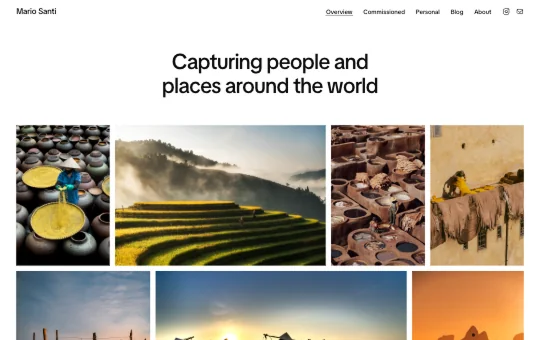
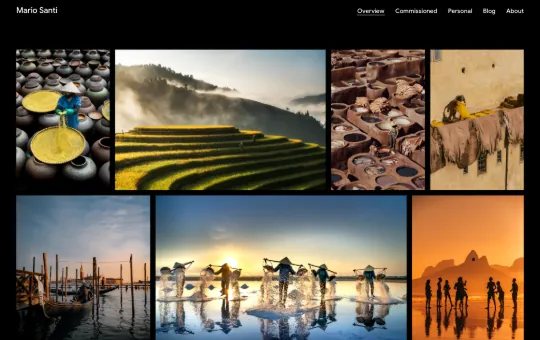


Photography Starter

Presets

About

The Photography Starter site is designed to showcase your photography in its best light. Created for photographers, visual storytellers, and creative professionals, it features image-focused layouts for your work, along with a blog and an about page. Its justified image galleries, enhanced with a lightbox, let your images take center stage.

This responsive WordPress starter site offers a polished starting point for building a professional photography website. With the Twentig Customizer, you can start with a design preset and tailor the homepage, header, footer, blog, colors, and typography to create a website that complements your photography.

WordPress version

7.0 or higher

Twentig version

2.0 or higher

Theme

Twentig One

Designer

Yann Collet

How to import this starter site

There are two ways to import the Photography Starter Site into WordPress.

Before you begin, make sure the Twentig plugin and the Twentig One theme are active.

The Photography Starter site is included directly in the Twentig plugin. Import it in one click, then customize it inside WordPress.

  1. In your WordPress dashboard, go to Twentig > Starter sites.
  2. Click Select, choose Photography, then click Import.
  3. Once imported, you’ll be guided through the Onboarding Customizer to personalize your starter site.

Want to customize before you import? Personalize the Photography Starter site on this page, then export and import it into WordPress when you’re ready.

Note: The Customize live feature is only available on desktop.

  1. Click Customize live at the top of this page.
  2. Customize your starter site and click Export. This downloads your starter site as an .xml file.
  3. In your WordPress dashboard, go to Twentig > Starter sites.
  4. Click Upload, choose or drop your .xml file, then click Import.

Give back to Twentig

If Twentig helped you build a website, please support us. Every donation makes Twentig better!